Weekly Review Printable Template: Turn Reflection into Action and Set Your Next Week Up for Success
Every week brings a mix of progress, setbacks, decisions, and small wins that often blur together. Without a structured pause to reflect, it becomes difficult to separate what worked from what drained your energy. The Weekly Review Printable Template is designed to create that pause — a practical tool that helps you assess your week, identify what moved you forward, and set clear intentions for the days ahead.
This template is not a passive journaling prompt. It is a repeatable framework for closing out one week and preparing for the next with clarity. Whether you are a freelancer managing multiple projects, a small business owner tracking growth, a marketer reviewing campaign performance, or someone simply trying to stay aligned with personal goals, this template fits into your existing workflow without adding unnecessary friction.
What the Weekly Review Printable Template Includes and How It Works
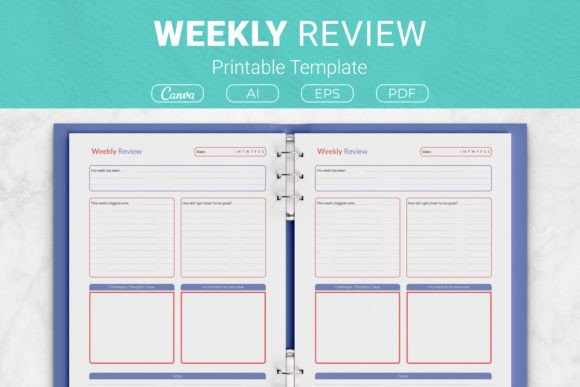
The template is organized into five core sections, each designed to capture a specific dimension of your week. Together, they create a complete picture of where you are and where you want to go.
- My Week: A broad reflection on how your week went overall. This is your high-level temperature check — not a detailed log, but an honest assessment of your energy, mood, and general satisfaction.
- Wins: A focused space to record your biggest accomplishments. This helps you reinforce what you did well and builds momentum into the next week.
- Goals: A look at how your actions aligned with your larger objectives. Did your daily choices move you closer to what matters most? This section bridges short-term effort and long-term direction.
- Challenges: An honest inventory of obstacles you faced. Naming challenges without judgment allows you to address patterns, adjust your approach, or seek support before they become recurring blockers.
- Next Week: A forward-looking section where you set your focus, priorities, and intentions for the upcoming week. This turns reflection into action.
By working through these sections in order, you move from observation to analysis to planning — a natural progression that respects your time and effort.
Where the Weekly Review Fits in a Broader Process
The Weekly Review Printable Template works best as a recurring checkpoint within a larger planning and productivity system. It is not a standalone solution but a complement to your daily task management, monthly goal tracking, and quarterly reviews.
If you already use a daily planner, a kanban board, or a digital task manager, the weekly review becomes the moment you step back from the granular details and look at the bigger picture. It answers questions your daily tools cannot: Am I making progress on what actually matters? Are my wins moving me toward my larger goals? Do my challenges point to a systemic issue I need to address?
For professionals managing multiple streams of work — a content creator juggling writing, filming, and client work; an educator balancing lesson planning and professional development; a small business owner overseeing operations and marketing — this template provides a consistent structure to evaluate across domains without letting anything fall through the cracks.
Interaction with Other Tools and Methods
The template is intentionally format-agnostic. It works alongside digital tools like Notion, Todoist, or Trello as a printed companion for deep reflection away from screens. It also integrates smoothly with analog systems like bullet journals or ring-bound planners. You can place it at the end of each week in your binder or use it as a standalone sheet that feeds into your monthly planning session.
The printable formats included — US Letter, A4, 7.5 x 9.25 in, and 6 x 9 in — mean you can choose the size that fits your existing binder or notebook system without having to adjust your setup. The editable AI and EPS files also allow you to modify sections, add branding, or tailor the layout to your specific workflow.
Practical Implementation: How to Use the Template Week After Week
Consistency matters more than perfection when using a weekly review. Here is a practical workflow that keeps the process simple and sustainable.
Set a Regular Time Slot
Block 15 to 30 minutes at the same time each week. Friday afternoon or Sunday evening works well for most people. Treat this appointment as non-negotiable — it signals to yourself that reflection is part of your process, not an afterthought.
Start with the Big Picture
Open with the "My Week" section. Write a few honest sentences about how the week felt overall. Do not overthink this. The goal is to capture your subjective experience before you dive into analysis.
List Wins Without Filtering
In the "Wins" section, include both obvious achievements and small progress moments. Completed a difficult task? Record it. Made a decision you had been avoiding? That counts. Sent an email that moved a project forward? List it. Wins are not limited to major milestones.
Connect Actions to Goals
The "Goals" section is where you assess alignment. Look at what you actually did this week and ask yourself: Did this bring me closer to my monthly or quarterly objectives? If yes, note how. If not, consider whether your goals need adjustment or your daily actions need realignment.
Name Challenges Objectively
In the "Challenges" section, focus on facts rather than self-criticism. What specific obstacle showed up? Was it a time constraint, a lack of information, an unexpected interruption, or a recurring pattern? Identifying challenges clearly makes them solvable.
Set One to Three Priorities for Next Week
In "Next Week," resist the urge to create a long list. Instead, choose one to three areas of focus. These could be tasks, habits, decisions, or themes. The goal is clarity, not volume. When your next week begins, you already know what deserves your attention.
Adapting the Template to Different Workflows and Personal Styles
The Weekly Review Printable Template is versatile enough to serve different contexts without losing its core structure. Here are a few examples of how different users might adapt it.
For Freelancers and Creators
Use the "Goals" section to track progress on multiple client projects or creative portfolios. The "Wins" section becomes a record of completed deliverables, new client inquiries, or skills learned. Challenges might include scope creep, inconsistent income, or time management across projects. Next week's focus can center on one high-impact client or a personal project that often gets pushed aside.
For Small Business Owners
The template can double as a lightweight operational review. Wins might include a successful product launch, positive customer feedback, or a process improvement. Goals connect to revenue targets, team growth, or operational efficiency. Challenges such as cash flow, supplier delays, or hiring difficulties become visible early. The "Next Week" section becomes your leadership priority list.
For Marketers and Educators
If you manage campaigns, content calendars, or curriculum delivery, the weekly review helps you separate execution noise from strategic progress. Wins could be a campaign that exceeded KPIs or a lesson that resonated with students. Challenges might include shifting deadlines, stakeholder feedback, or resource constraints. Use the "Goals" section to check whether your weekly output aligns with quarterly marketing or educational objectives.
For Personal Growth and Habit Building
The template also works outside professional contexts. Use it to track habits like exercise, reading, or time with family. Wins are personal milestones. Challenges are behavioral patterns or environmental triggers. The "Next Week" section becomes a tool for intentional habit stacking and self-compassion.
Using the Template for Long-Term Consistency and Quality Control
One of the most valuable aspects of a weekly review is the pattern recognition it enables over time. When you fill out the template consistently, you begin to see recurring themes in your wins and challenges. This data becomes the foundation for better decisions.
For example, if challenges often involve interruptions during deep work, you can adjust your schedule or environment. If wins frequently come from collaborative efforts, you might prioritize team projects. The template does not just record the past — it reveals the conditions that help you thrive.
This long-term perspective is especially useful for KDP publishers or content creators who produce planners and journals. Understanding how users interact with a printed planning tool — what sections they use most, where they need more space, how they connect reflection to action — can inform future product designs and improvements.
Practical Factors: Preparation, Compatibility, and Usability
Getting started with the Weekly Review Printable Template requires minimal setup. Here is what to consider.
Format and Sizing
The template comes in four sizes: US Letter, A4, 7.5 x 9.25 in, and 6 x 9 in. If you use a standard three-ring binder, US Letter or A4 works well. For travelers or those with limited desk space, the smaller sizes are practical. The PDF files are ready to print, so no additional formatting is needed.
Editable Files and Customization
For users who want to modify the template — add sections, change headings, or incorporate branding — the package includes AI and EPS files that work with Adobe Illustrator. A link to Canva templates is also provided, making customization accessible even without specialized software. This is particularly useful for KDP publishers who want to create planner interiors tailored to a specific audience.
Integration into a Binder System
The template is compatible with disc-bound, ring-bound, or spiral-bound planners. If you keep a master binder with monthly tabs, insert the weekly review sheets at the beginning of each week's section. This way, you build a running archive of your reflections that you can reference during monthly or quarterly reviews.
How long does it take to fill out?
Most people complete the template in 15 to 30 minutes. The time decreases as the process becomes familiar. The goal is thoughtful reflection, not exhaustive documentation.
Can I use it digitally?
While the template is designed for print, the PDF files can be imported into note-taking apps like GoodNotes, Notability, or OneNote for digital annotation. The Canva link also allows for digital editing if you prefer to type your reflections.
What if I miss a week?
Missing a week is normal. Do not try to catch up by filling out past weeks. Simply start again with the current week. The template is a tool for forward motion, not a record-keeping obligation.
Final Observations on Making the Weekly Review Stick
The Weekly Review Printable Template is most effective when it becomes a habit, not a chore. The structure is designed to be flexible enough to adapt to changing priorities while maintaining a consistent format that builds a reliable record over time.
If you are new to weekly reviews, start with the printed PDF version. Place it somewhere visible — on your desk, in your planner, or on a clipboard. After four to six weeks of consistent use, review your collected sheets. You will likely notice patterns in your productivity, energy, and decision-making that were invisible before.
For experienced planners, the editable files and multiple sizes allow you to refine the template to match your existing system without starting from scratch. The template becomes a component of your broader productivity architecture — one that supports both reflection and forward planning without adding complexity.
The Weekly Review Printable Template bridges the gap between what happened and what comes next. It is a small investment of time each week that pays dividends in clarity, focus, and intentional action. Whether you use it for professional projects, personal growth, or creative work, the act of pausing to reflect and plan is one of the highest-leverage practices you can build into your routine.