Daily Study Planner Printable Template
If you’ve ever sat down to study only to realize you forgot what you were supposed to cover, or you end up scrolling your phone for twenty minutes before opening a textbook, you’re not alone. Staying focused during study sessions requires more than good intentions—it takes a system. That’s where a structured daily planner can make all the difference. The Daily Study Planner Printable Template is designed to help you take control of your day, one session at a time. Whether you’re a student juggling multiple subjects, a freelancer learning a new skill, or a professional preparing for a certification, this template gives you a clear framework to plan, track, and reflect on your progress.
What Is the Daily Study Planner Printable Template?
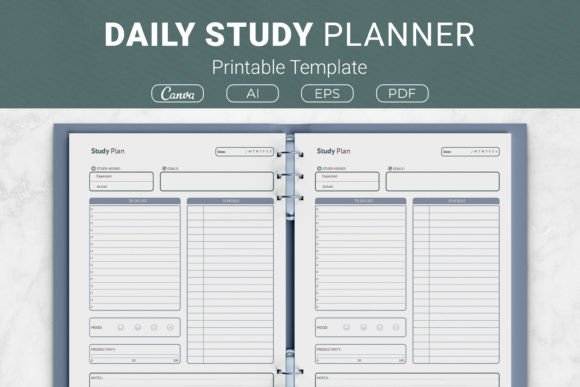
At its core, this template is a printable, customizable document that breaks down your study day into actionable sections. It includes a to-do list, a schedule, a mood tracker, productivity progress bars, a dedicated area for study hours, goal-setting space, and a notes section. It’s available in multiple sizes—US Letter, A4, 7.5×9.25 inches, and 6×9 inches—so you can print it for binders, planners, or KDP interiors. The package comes with source files in AI, EPS, PDF, and a link to editable Canva templates, which means you can tweak colors, fonts, and layouts before printing. The goal is simple: give you a practical tool that fits into your real-life routine, not a rigid system that feels like extra homework.
Where and When People Actually Use It
You might think a study planner is only for high school or college students, but the reality is broader. Adults between 20 and 50 use it in a surprising variety of contexts.
During Morning Planning Sessions
Imagine you’re a freelance graphic designer who wants to learn motion graphics. Your days are packed with client work, so you have to carve out time deliberately. You grab a printed A4 version of the planner each morning, jot down your to-do list for the day—maybe “watch Blender tutorial,” “practice keyframes,” and “review last session’s notes.” Then you schedule two 45-minute study blocks in the morning before client calls. The mood tracker helps you notice that you focus better after a walk, so you adjust your routine. By tracking study hours, you realize you’re actually clocking more time than you thought, which boosts your motivation.
During Lunch Breaks or Commutes
Not everyone has a dedicated home office. Many people study during lunch breaks at work or on public transport. The 6×9 inch size fits neatly into a bag, and the compact layout lets you plan a 30-minute session without feeling overwhelmed. A marketer studying SEO might use the schedule section to block out 15 minutes for keyword research and 15 minutes for reading a case study. The notes section becomes a quick reference for terms you want to look up later. This isn’t about perfect planning—it’s about making the most of small windows of time.
In the Evening for Reflection
One of the most underrated parts of the template is the productivity progress and mood tracker. After a long day, you can fill in how productive you felt and what your mood was during study. Over a week, patterns emerge. For example, a small business owner learning bookkeeping might notice that late evening sessions lead to frustration and lower retention. That insight prompts them to shift study time to early afternoon when energy is higher. The planner doesn’t just help you plan ahead—it helps you learn about your own habits.
Students (Ages 18–30)
Traditional students often juggle multiple classes, extracurriculars, and part-time jobs. The template’s to-do list and schedule sections prevent things from falling through the cracks. Instead of scribbling “study for exam” on a sticky note, you break it into steps: “review chapter 4,” “do practice quiz,” and “make flashcards.” The mood tracker is especially useful for spotting burnout early. If you notice several days of low mood and low productivity, you can take a mental health day or adjust your workload. The planner becomes a self-care tool disguised as a productivity sheet.
Lifelong Learners and Hobbyists
Adults in their 30s and 40s often pick up new skills for personal fulfillment—playing an instrument, learning a language, or understanding coding basics. The goals section lets you set a long-term target (e.g., “hold a 5-minute conversation in Spanish by summer”) while the daily schedule keeps you accountable. A hobbyist studying photography might use the study hours area to track that they’ve practiced for 3 hours this week, prompting them to go shoot portraits over the weekend. The planner adapts to casual learning just as well as serious study.
Educators and Tutors
Teachers or tutors can use the template to plan their own lesson prep or to recommend it to students. The package includes open-source AI and EPS files, so an educator can modify the layout to include a “reward” section or extra note space. Because it’s available in both US Letter and A4, it fits standard printers worldwide. One educator might print a stack for their tutoring students, helping them build independent study habits. The Canva template link means non-designers can still personalize it without learning professional software.
Freelancers and Entrepreneurs
Running a business means constantly learning—new marketing strategies, tax regulations, or software updates. The planner helps structure that learning around client work. A freelancer could use the productivity progress bar to rate how effective their study session was (1–10) and note what helped: “used noise-canceling headphones” or “studied right after coffee.” Over time, they can optimize their environment. The notes section is also handy for capturing ideas generated during study, which might later become business improvements.
Publishers and KDP Authors
Because the template is designed as a KDP interior, self-publishers can include it in journals or academic planners. The package comes with PDF files ready to print and covers multiple trim sizes, making it a plug-and-play resource for low-content publishing. A KDP author can use the AI files to adjust the color palette for their brand and then upload to Amazon. The templates are generic enough to appeal to students worldwide, yet specific enough that users immediately see the value. For publishers, this saves hours of layout work.
What to Consider Before Downloading or Using
Before you hit “download,” think about how the template will fit into your actual routine. It’s not a magic solution—it’s a tool that works best when paired with consistent use. Here are a few things to keep in mind.
- Choose the right size for your printer or binder. If you plan to keep it in a standard binder, go with US Letter or A4. For a pocket planner that travels with you, the 6×9 inch version is ideal. The 7.5×9.25 size works well for half-letter binders. If you buy the package, you get all sizes, so you can experiment.
- Consider your editing needs. If you want to change headings, colors, or add your logo, use the AI, EPS, or Canva link. If you just want to print and go, the PDF is ready. No design skills are required for the PDF version.
- Plan how you’ll fill it out. Some people prefer to print a week’s worth at a time and fill in morning or evening. Others print a month’s worth and store them in a binder. The template works both ways. The key is to make it a habit rather than a one-time experiment.
- Think about the mood tracker realistically. The mood section is simple—just a few faces or a color scale. Don’t overthink it. Even a quick smiley face can reveal how your emotions affect your study stamina. Over time, you’ll learn which subjects drain you and which energize you.
- Don’t skip the notes section. Students often treat notes as an afterthought, but that’s where you capture questions, insights, or reminders. When you review old planners, the notes can show you your learning journey. They also help you prepare for the next session faster.
Real Outcomes from Real Use
The true value of the Daily Study Planner Printable Template shows up after a few weeks of consistent use. A college student might find that their study hours per week doubled because the schedule prevented procrastination. A freelancer studying digital marketing could pass a certification exam on the first try thanks to daily goal tracking. A retiree learning piano might feel more motivated because the productivity progress bar gives them a sense of achievement even on rough days. None of these outcomes come from the paper itself—they come from having a structured way to think about time, energy, and learning.
You don’t need to be a meticulous planner to benefit. The template is forgiving. Miss a day? Just pick up the next blank sheet. The layout is intuitive enough that you can start using it within five minutes of printing. And because the package includes source files, you can tweak it endlessly until it feels like your own. That’s the difference between a generic planner and a personally adapted one.
Connecting Features to Everyday Benefits
Instead of listing features, think about how each part applies to your situation.
- To-do list: Breaks overwhelming study goals into manageable actions. You cross off items as you go, which gives small dopamine hits and keeps momentum.
- Schedule: Helps you allocate time realistically, not ideally. If you have only 30 minutes between meetings, you can schedule a review session rather than starting a new topic.
- Mood tracker: Brings self-awareness. You might notice that studying right after a heavy meal makes you sluggish, so you adjust timing.
- Productivity progress: Encourages honest self-reflection. Rating a session a 6 instead of a 10 is okay—it helps you learn what conditions improve your focus.
- Study hours: Simple counter. Over a week, you’ll see exactly how much time you invest. That data can justify why you need to reprioritize other commitments.
- Goals: Keeps the big picture visible. Even when a daily session feels small, seeing your longer-term goal reminds you why you’re doing this.
- Notes: Captures stray thoughts, questions to ask a tutor, or links to resources. It turns the planner into a mini study journal.
None of these sections require a lot of time to fill. The whole process—planning a session—shouldn’t take more than five minutes. The rest of the time you spend actually studying.
Final Practical Tips
If you decide to download or create your own version of the Daily Study Planner Printable Template, here are a few observations from people who have used similar tools for months.
- Print a few extra copies and keep them in a folder. That way, when you’re out, you’re not tempted to skip planning.
- Use the Canva template if you want digital flexibility. You can edit, save to PDF, and print only what you need. This saves paper and lets you keep a digital archive.
- Don’t pressure yourself to fill every section every day. Some days the mood tracker is blank, and that’s fine. The planner works for you, not the other way around.
- Share the template with study buddies or accountability partners. When you both use the same format, you can compare productivity approaches or even co-plan sessions.
- If you’re a KDP author, consider adding a brief guide inside your journal explaining how a user might fill out each section. That adds value and helps reviews.
The Daily Study Planner Printable Template is not a gimmick. It’s a practical tool designed by people who understand that studying is rarely linear. Life interrupts, motivation dips, and schedules shift. This template gives you a flexible foundation to return to, again and again, no matter how chaotic your day gets. Whether you’re studying for a degree, building a skill, or just staying curious, having a plan—even a simple, printable one—can turn scattered efforts into real progress.