Your Complete Social Media Marketing Planner Guide
If you’ve ever tried to juggle content calendars, audience insights, and campaign deadlines all at once, you know how quickly social media marketing can turn into a chaotic mess. That’s exactly where a Social Media Marketing Planner comes into play—not as another tool to learn, but as a practical system to keep your strategy organized and actionable. With Canva’s interior templates, you can build a planner that matches your workflow without spending a dime on premium software. The best part? You get print-ready PDF and JPEG files, plus editable Canva links, so you can tweak everything from your monthly goals to your hashtag lists.
What Makes This Planner Stand Out
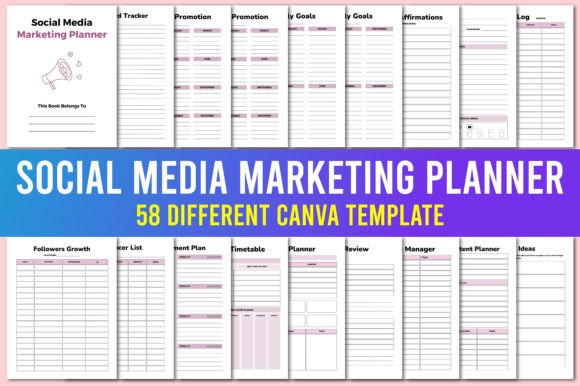
Visually, the Social Media Marketing Planner feels like a cross between a bullet journal and a professional dashboard. It uses clean sans serif typography for headings and a soft serif for body text, which gives it an approachable but credible tone. The layout includes spacious grids, subtle pastel accents, and enough white space to keep even a packed weekly schedule from feeling overwhelming. You’ll find dedicated sections for everything listed in the checklist—monthly goals, business affirmations, post ideas, blog income logs, follower growth trackers, and even a password tracker. Each page has a distinct personality: the “Belongs To” page feels inviting, the seasonal promotion tracker is bright and deadline-oriented, and the series planner leans into creative brainstorming. This variety means you’re not stuck with one rigid design. Instead, the template adapts to how you actually work, whether you’re a blogger mapping out content themes or a small business owner scheduling Facebook ads.
Where This Template Works Best Across Your Projects
Because the Social Media Marketing Planner comes as both editable Canva files and high-resolution print-ready files, it fits seamlessly into digital and physical workflows. Print the PDF for your physical desk binder or alongside your editorial calendar. Use the JPEG for quick reference screenshots you can pin to your desktop or share with your virtual assistant. The template’s design works especially well for:
- Content creators and bloggers who need to track Instagram stories, YouTube video scripts, and Pinterest board performance in one place.
- Marketers and brand strategists running multiple campaigns across Facebook, LinkedIn, and Twitter—the advertising trackers are ready to log spend, impressions, and conversions.
- Small business owners and entrepreneurs who want a monthly goals page that pairs with business affirmations and a quick improvement plan. The “Find Your Tribe” sections help you identify collaboration opportunities without extra research.
- Designers and publishers managing both client accounts and personal brands. The “My Accounts” and “Password Tracker” pages are straightforward and secure, plus the giveaway tracker keeps contest deadlines in check.
What I appreciate most is the inclusion of two unique “Follower Tracker” pages and a dedicated social media audit page. These aren’t afterthoughts—they’re designed to help you compare growth month over month and spot trends before they become problems. If you prep a quick audit every quarter, you can adjust your posting timetable and hashtag strategy based on real data.
How the Planner Boosts Readability and Brand Consistency
A well-structured planner does more than keep you organized—it shapes how you perceive your own brand. The Social Media Marketing Planner uses consistent heading sizes and a clear visual hierarchy, so you always know where to look for your posting timetable versus your post review notes. This consistency translates directly to your content. When you regularly see your own affirmations and goals formatted cleanly, you’re more likely to carry that same professionalism into your social media graphics and editorial design. The template’s use of separate typefaces for display and body text also helps you practice font pairing in a low-pressure environment. You can experiment with different serif and sans serif combinations inside the Canva file, then apply the winning pair to your actual posts. Over time, that attention to typography builds audience recognition—people start associating your specific look with trustworthy, polished content.
From a brand perception standpoint, using a dedicated planner like this signals that you take your social media strategy seriously. It moves you from reactive posting to intentional scheduling. The monthly goals page paired with the improvement plan means you’re constantly refining your approach, and the post content planner gives you space to draft captions and calls to action before you hit publish. That extra step alone can improve engagement, because you’re not rushing to write something five minutes before a scheduled post.
Practical Tips for Customizing Your Planner in Canva
To get the most out of this template, start by navigating to your Canva homepage and making a personal copy of the document. This ensures the original link stays active and you have a fresh version to tweak. Once you’re inside, focus on these steps:
- Test font pairings early. The planner already uses a balanced sans serif and serif combination, but you might prefer a bold display font for your seasonal promotion page or a handwritten font for your business affirmations. Swap one section at a time, then review how it affects readability on both screen and print.
- Adjust the color palette. The soft pastels work for most brands, but if your identity leans into darker or more saturated tones, update the accent colors. Keep contrast high enough that your monthly goals and follower tracker numbers are easy to read at a glance.
- Use the post ideas page as a content bank. Instead of filling it in chronological order, treat it like a creative playground. Brainstorm seasonal promotions, series ideas, and one-off concepts, then pull from it when you update your posting timetable each week.
- Review included styles for commercial use. If you plan to use the planner with clients or as part of a paid service, double-check the font licensing inside Canva. Most of the standard library assets are covered for commercial projects, but it’s worth confirming before you distribute the output.
- Print one test copy. Even though the JPEG and PDF files are print-ready, always run a single test page to ensure margins, bleeds, and spot colors look right. Adjust the file settings if your printer handles them differently.
Another thing I’ve found helpful is to pair the planner with a simple weekly review. Set aside 30 minutes every Sunday to fill in your daily planner for the upcoming week, update your follower tracker, and check your advertising tracker against your monthly goals. This habit turns the planner from a static template into a living part of your workflow.
Real-World Application and Design Observations
In practice, the Social Media Marketing Planner works best for people who need structure but hate rigid systems. The template gives you plenty of space to customize—the “Post Ideas” section isn’t limited to a specific niche, and the “Hashtag Manager” can hold both evergreen tags and campaign-specific ones. One designer I know uses the series planner to map out entire Instagram Reels series, tracking each video’s concept, filming date, and post link. Another small business owner prints the “Seasonal Promotion” page and hands it to her team during monthly planning meetings. They brainstorm offers together, then she transfers the final plan to the Facebook and Pinterest advertising trackers.
From a design standpoint, the template’s strength lies in its adaptability. It doesn’t try to force you into one workflow. The “Follower Tracker” pages are duplicated intentionally—one for overall growth and one for individual platforms or campaigns. Similarly, the social media audit page is separate from the improvement plan, allowing you to do deep dives when you have time and quick check-ins when you don’t. If you ever feel stuck on how to start, just copy the document, pick one tracker, and fill it out for the current month. That small step often sparks momentum for the rest of the planner.
Ultimately, a Social Media Marketing Planner built in Canva gives you the freedom to iterate without friction. You can change fonts, swap out checklists, or add new pages as your strategy grows. The print-ready files ensure you always have a physical backup, and the editable links let you collaborate with a VA or client in real time. Whether you’re a seasoned marketer or a blogger building your first content schedule, this template delivers the structure you need without the overhead of expensive project management tools.