Track Clients, Not Chaos: A Client Appointment Tracker KDP Interior
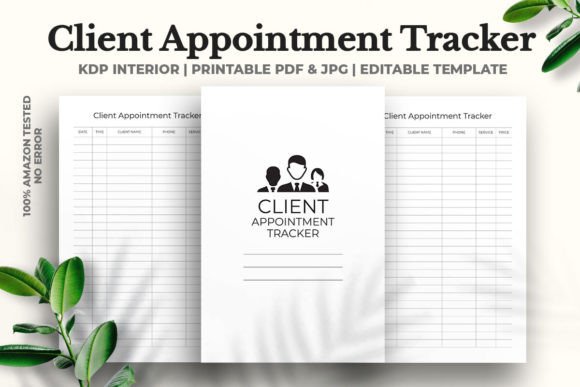
If you’re running a publishing business on Amazon KDP, your client list is your most valuable asset. Between coordinating with ghostwriters, managing cover designers, and tracking strict deadlines, it’s easy to let a follow-up call or consultation slip. A dedicated system changes that. The Client Appointment Tracker KDP Interior provides a structured, professional framework that keeps your operations running smoothly. Designed for the self-publishing entrepreneur, this 6x9 inch, 120-page template is built to integrate seamlessly into your existing workflow—whether you prefer a printed notebook or a digital planner.
Why a Dedicated Client Tracker Belongs in Your Workflow
Relying on scraps of paper or a generic spreadsheet might work for a week, but as your client base grows, so does the risk of miscommunication. A dedicated interior template standardizes how you log appointments, record notes, and follow up. This isn’t just about staying organized; it’s about projecting reliability. When you present a clean, consistent format to a client, you signal that you run a professional operation. The Client Appointment Tracker KDP Interior helps you maintain that standard without requiring you to design a layout from scratch. It’s a practical tool that saves time and reinforces your credibility with every entry.
Visual Design Meets Real-World Functionality
Let’s talk about what this interior looks like and how it feels to use. The format is intentionally practical. The 6x9 inch trim size is a standard for non-fiction and business books, which makes it familiar, easy to handle, and cost-effective to print on KDP. The interior is clean and uncluttered, with no decorative flourishes that get in the way of function. There’s no bleed on the pages, which simplifies the upload process and removes a common error point for new publishers.
Because the design leans toward a modern typography approach, it prioritizes readability and scannability. You won’t find overdone ornamentation or distracting backgrounds. Instead, the layout does its job quietly. It functions much like a dependable sans serif font—neutral, highly legible, and versatile. This makes it suitable for a wide range of business contexts, from one-on-one coaching sessions to high-volume client management for a marketing agency.
The Technical Edge: Vector Editability and Print Readiness
What truly sets this template apart is the file structure. It includes a fully vector editable PDF that can be opened in Adobe Illustrator. This means every line, text box, and shape uses mathematical paths instead of pixels. You can resize, recolor, or reposition any element without losing resolution or dealing with fuzzy edges. If your brand uses specific hex codes, or if you want to print the tracker at a different trim size, you have full control. The package also includes a high-resolution JPG at 300 DPI, which is perfect for creating mockups, previews for clients, or social media graphics to promote your offerings. Having both file types gives you flexibility while ensuring your master file remains crisp and scalable. The template has been 100% tested on Amazon KDP, so you can upload it directly without worrying about formatting errors, margin shifts, or bleed line rejections.
Who Benefits Most from This Interior Template?
While the Client Appointment Tracker KDP Interior is optimized for KDP publishers, its applications are broader than you might think. Any professional who manages external contacts can adapt it to their workflow.
- KDP Publishers and Authors: Keep track of interviews, editor check-ins, and cover design reviews without juggling multiple platforms.
- Freelancers and Solopreneurs: Manage client calls, project milestones, and follow-up tasks in one central location. You can even offer it as a bonus gift to your own clients to help them stay organized.
- Coaches and Consultants: Use the structured space to log session notes, action items, and next steps. A consistent format makes it easier to review past interactions and prepare for future meetings.
The template’s neutral style is also ideal if you want to white-label it. Because it’s vector editable, you can easily rebrand it for your agency, studio, or personal brand without leaving any trace of the original generic layout.
How to Customize Your Tracker Without Overcomplicating It
One of the biggest advantages of this template is the control it gives you over customization. Here’s practical advice for getting the most out of it without introducing unnecessary complexity.
Start with the vector PDF in Adobe Illustrator. Change the header colors to match your brand palette, add your logo at the top, or adjust the font used for section titles. If you do add a title or label, choose a pairing that supports the structure. A crisp sans serif font for the body keeps the information grounded, while you could introduce a display font or handwritten font for your title page or specific note sections if you want a more personal touch. Just ensure that readability remains the priority—if a client or team member can’t scan the page quickly, the design has failed its purpose.
Be mindful of font embedding. If you change the typeface within the PDF, ensure the custom fonts are embedded or converted to outlines before uploading to KDP. The provided file is ready to go as-is, but customizing it adds a step where errors can occur. The same caution applies to logo design files—keep them high-resolution and properly placed within the safe margins. Because this interior has no bleed, you have a clear boundary to work within. Respecting that boundary ensures your custom version passes KDP’s automated checks without issue.
Readability, Scannability, and Brand Perception
You might think a client appointment tracker is purely functional, but its design has a direct impact on how you and your clients perceive your business. A well-structured layout creates a sense of order and competence. This visual hierarchy helps you locate information in seconds. When you present a professional, clean layout to a client—whether as a printed page or a shared digital file—it signals that you are organized and detail-oriented. In the competitive world of publishing and freelance services, small signals like this build trust and credibility over time.
Consistency across your design assets also strengthens your brand identity. If your book covers use a specific serif font and your website uses a complementary sans serif font, your appointment tracker should feel like part of the same family. Using the same colors, logo placement, and structural logic creates a seamless experience for anyone who interacts with your brand. This template provides the perfect foundation for that consistency without requiring you to become a layout expert. It’s a commercial font for your operational toolkit—a workhorse that supports everything else you’re building.
Practical Guidance on Choosing and Using This Template
When evaluating any KDP interior, look beyond the page count and trim size. Consider the file format and the level of support. Because this template comes from a professional global creative collective with over ten years of experience in high-end branding and product development, the attention to technical detail is a significant advantage. They have tested the upload process specifically on Amazon KDP, so you aren’t guessing whether the margins or spine will hold up.
Here’s a quick check for evaluating project fit:
Assess your volume. 120 pages is substantial enough for a quarterly or semi-annual tracker. If you need more, the vector editability allows you to duplicate pages and expand the file.
Review the included styles. The template is designed with a neutral, functional aesthetic. If your brand leans toward a more decorative style, use the vector file to inject your personality. Add a subtle background pattern or a script font for headings if it fits your brand voice. Just keep the body clear and scannable.
Consider the user experience. A font pairing that works beautifully on a book cover might feel heavy in a daily tracker. Simplicity almost always wins in functional design. If you’re unsure, test a few pages with your actual workflow. Fill them out for a week and see if the structure supports or hinders your process.
The commercial font licensing for any typeface you add is your responsibility, but the template itself is fully licensed for your business use, including selling the final printed product on Amazon.
Final Thoughts on Building a Professional Client Management System
The Client Appointment Tracker KDP Interior is more than a blank notebook replacement. It’s a tested, professionally designed tool that respects your time and enhances your brand’s credibility. Whether you use it as a printed journal on your desk, import it into a digital app like GoodNotes for annotation, or customize it to sell as your own branded product, the flexibility is built in. The vector editability, the no-bleed format, and the high-resolution assets give you control without the guesswork.
Take advantage of the experience behind the product. The creative collective that developed this template has spent over a decade working on high-end editorial design, packaging design, and web design projects. They understand what makes a layout functional and what causes production errors. This interior is the result of that expertise, and it’s ready to support your client management workflow from day one.