Halloween to Do List - Kdp Interior
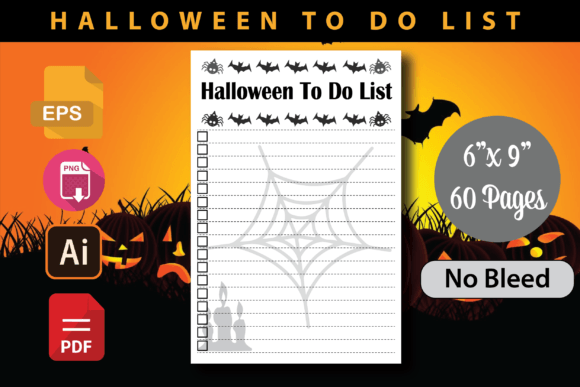
If you are selling low-content books on Amazon KDP, you already know the difference between a well-prepared interior and one that causes headaches. The Halloween to Do List - Kdp Interior is a ready-made journal template designed specifically for independent publishers and KDP sellers who want to create a Halloween-themed to-do list book. It comes as a complete package: a print-ready PDF, an AI template, an EPS template, and a PNG image, all set at 6×9 inches with no bleed and 300 DPI resolution. That combination sounds straightforward, but many publishers trip over small details that turn a smooth upload into a frustrating rejection. Let us walk through what actually matters when you work with this interior, where people commonly go wrong, and how you can avoid those missteps.
What the Halloween to Do List Interior Actually Includes
Before you download anything, know exactly what is inside the package. The Halloween to Do List - Kdp Interior gives you a PDF file that is ready to upload, an AI template for Adobe Illustrator users, an EPS template for vector editing, and a PNG image for previews or cover integration. The trim size is 6×9 inches with no bleed, meaning the content fits perfectly within standard book dimensions without requiring extra margin trimming. The PDF is set at 300 DPI, which is the resolution Amazon requires for quality printing.
One misunderstanding I see often is people assuming the interior includes a cover. It does not. This is strictly an interior file. You will still need to create or purchase a separate cover. Another overlooked detail: the PNG image is useful for mockups or promotional materials, not for upload as a book interior. Uploading it by mistake will get your file rejected immediately.
Mistake One: Uploading Without Testing the PDF Yourself
The file is labeled as tested and 100 percent ready for KDP uploads. That is true, but trust does not replace verification. I have seen people download the Halloween to Do List interior, upload it straight to KDP, and then wonder why Amazon flags an issue with margins or text placement. The problem is rarely the file itself. It is almost always a mismatch between the interior and the cover dimensions, or an accidental change made during editing.
Before you upload, open the PDF in a reliable viewer. Check every page. Confirm that the margins are even, the text is legible, and there are no stray marks or empty pages. If you edit the AI or EPS template and export incorrectly, you can introduce spacing problems that were not there originally. Always test the final PDF the same way Amazon will.
Mistake Two: Ignoring the No-Bleed Requirement
The Halloween to Do List - Kdp Interior is specifically designed with no bleed. That is a deliberate choice. Some publishers see the words "no bleed" and assume they can add background colors or decorative borders that extend to the edge. You cannot. If you try to add full-page background graphics to a no-bleed file, your content will get cut off or cause trim errors. This interior works best for clean, functional layouts where the focus stays on the to-do list prompts and Halloween themes, not on edge-to-edge artwork.
If you want a more decorative interior with full-page illustrations, you need a bleed version. This particular file is not that. Stick to the intended use, and you will avoid upload failures.
Mistake Three: Overcomplicating the AI or EPS Template
The AI and EPS files are there for customization. You can change fonts, adjust colors, or add your own Halloween elements. But keep it simple. I have watched publishers try to overhaul the entire design, only to end up with a file that does not align properly when exported. The original template is balanced. If you start moving text boxes or resizing elements without understanding how the grid works, you risk misalignment.
Here is a better approach: make small, deliberate changes. Adjust the heading color. Swap in a different festive font. Add a subtle graphic to the corner. Then export a test page and compare it to the original PDF. If anything looks off, revert the change. You can always build complexity later, but a clean, readable interior will always outperform a crowded one.
What to Check Before You Upload to KDP
You can save yourself a rejection notice by running through a short checklist before hitting submit.
- Page count: The interior should have an even number of pages. Odd page counts cause blank pages and confuse the printing process.
- Margins: Use Amazon's Kindle Create or the KDP preview tool to verify that no content falls outside the safe zone.
- Font embedding: If you customized the AI or EPS file, ensure all fonts are embedded in the PDF. Missing fonts cause substitution errors that ruin your layout.
- File naming: Name your file something clear like "Halloween-To-Do-List-Interior.pdf" so you do not mix it up with cover files.
- Resolution: Confirm the PDF is still 300 DPI after any edits. Exporting at lower resolution will result in blurry print quality.
These checks take maybe ten minutes. Skipping them can cost you days of back-and-forth with Amazon support.
How the 6x9 Trim Size Affects Your Book's Presentation
The 6×9 inch trim size is one of the most popular for journals and planners. It is large enough to feel substantial but small enough to be portable. For a Halloween to-do list journal, that size works well because it gives users enough space to write without feeling cramped. The Halloween to Do List - Kdp Interior is built specifically for this dimension, so you do not need to scale or adjust anything.
A common mistake here is choosing a different trim size at upload and trying to force the interior to fit. Amazon's system will warn you if the dimensions do not match, but some publishers override the warning anyway. Do not do that. The interior is tested for 6×9. Use that size. If you want a different trim size, look for an interior designed for that dimension instead of forcing a mismatch.
Why 300 DPI Matters More Than You Think
Three hundred DPI is the standard for professional book printing. It ensures text is crisp and any graphics appear smooth. The Halloween to Do List interior comes at this resolution, so you start from a good place. The trouble begins when you edit the file and export it at a lower resolution to reduce file size. Do not do that. Amazon will reject interiors that fall below the minimum DPI threshold, and even if they accept it, the printed result will look disappointing.
If you are worried about file size, compress the PDF using tools that preserve resolution. Many modern PDF editors offer lossless compression that keeps 300 DPI intact while reducing megabytes. That is a safe route. Lowering the DPI is not.
Practical Advice for Independent Publishers and KDP Sellers
You are likely juggling multiple books, deadlines, and marketing tasks. The appeal of a pre-made interior like this one is that it removes a whole layer of production work. But it only saves you time if you use it correctly.
- Do not redo the layout. The interior is already tested for KDP. Trust the structure. Focus your energy on the cover, the description, and the keywords.
- Use the PNG file wisely. That image is great for social media previews, blog posts, or listing images. It is not for the book itself. Keep it in your marketing folder, not your upload folder.
- Keep a backup. Store the original unedited PDF somewhere safe. If you ever need to reupload or make a new edition, you will thank yourself.
Why Rejection Happens and How to Avoid It
Amazon rejects books for many reasons, but with a pre-made interior like the Halloween to Do List - Kdp Interior, rejection usually comes down to three things: mismatched dimensions, missing bleed settings, or corrupted files. The interior itself is tested, but once you start editing, you introduce risk.
Let us be realistic. You download the files. You open the AI template to change the font color. You export as PDF. Somewhere in that process, the margin shifts by a millimeter. Amazon's system catches it. You get a rejection email. That is not because the original interior was bad. It is because the export introduced a tiny error.
To avoid that, export a single page first. Open it in a viewer. Measure the margins. Compare it to the original PDF. If everything matches, export the full file. That extra step catches the vast majority of layout errors.
Making the Most of Your Halloween Themed Journal
A to-do list journal with a Halloween theme can sell well if it feels purposeful. People buying it want something festive but functional. The interior you are working with gives you clean prompts and a seasonal aesthetic. Keep the design focused. Do not overload it with decorations that distract from the task at hand.
Think about your audience. They might be using this journal to organize Halloween party planning, costume prep, decorating schedules, or trick-or-treat logistics. The interior should make their list-making easier, not harder. That is why the clean layout and tested formatting matter. A frustrating interior leads to bad reviews. A smooth one leads to repeat buyers.
Final Thoughts Before You Download
The Halloween to Do List - Kdp Interior is a solid choice for independent publishers who want to launch a seasonal journal quickly. It includes everything you need in terms of file formats and resolution. The real work is in how you handle it after download. Test the PDF, respect the no-bleed constraint, keep your edits minimal, and verify everything before upload. That approach will save you from rejections and give you a product that looks professional on Amazon and in customers' hands.
Seasonal books have a short window. Do not waste that window fixing preventable mistakes. Use the interior as intended, check the details, and get your book live while the Halloween demand is strong. That is the practical path to a successful launch.