Digital Notes Template for Organized Life
If you have ever stared at a messy notebook or struggled to keep your digital files neat, you already understand the appeal of a well-designed note-taking system. A digital notes template offers a structured way to capture ideas, tasks, and information without starting from scratch each time. Unlike a blank page, these templates provide a framework that helps you think clearly, stay consistent, and work faster. They are especially useful for anyone who uses a tablet, iPad, laptop, or even a smartphone for daily notes.
What Exactly Is a Digital Notes Template?
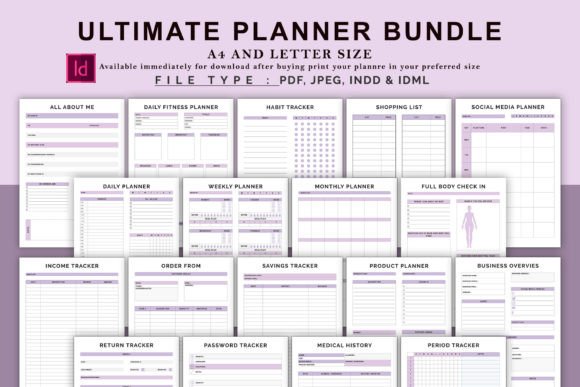
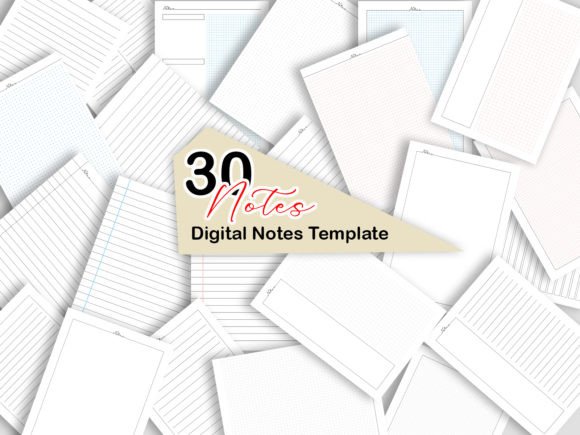
A digital notes template is a pre-made page layout designed for note-taking apps like GoodNotes, Notability, OneNote, or even PDF annotation tools. Instead of drawing lines or boxes yourself, you open a ready-made page with soft lines, clean sections, and a white background that makes your handwriting or typed text stand out. The templates in this particular pack come with 30 unique pages, each created to support a different aspect of note-taking, planning, or brainstorming.
The white background and subtle lines are intentional. They minimize visual distraction while giving you gentle guidance for alignment, spacing, and organization. This approach is especially helpful if you use colored pens, highlighters, or decorative elements, because the clean backdrop makes those colors pop without competing for attention.
Who Benefits from Using These Templates?
Digital notes templates appeal to a wide range of people. Beginners who are new to digital planning will appreciate how easy it is to get started. Instead of setting up margins, headers, or bullet points, you simply open a page and begin writing. Casual users enjoy the flexibility of having multiple layouts for different tasks, while creators and professionals can maintain a consistent visual identity across all their notes.
Entrepreneurs, small business owners, bloggers, and marketers often use these templates for meeting notes, content brainstorming, project tracking, and client planning. Educators and students find them helpful for lecture summaries, study guides, and lesson plans. Freelancers and hobbyists use them for journaling, sketching ideas, or managing personal projects. In short, if you write, plan, or think on a digital device, a good template makes the process smoother.
Core Purpose and Value of a Good Template
The main purpose of a digital notes template is to reduce friction. When inspiration strikes or a meeting ends, you want to capture information quickly, not spend time formatting pages. Templates also promote consistency. When you use the same layout repeatedly, your brain starts to associate that structure with focused work, which can improve concentration and recall over time.
Another important value is portability. These templates come in A4, A5, and US Letter sizes, so they work across devices and regions. You also receive JPG files in A4 size, which is helpful if you prefer importing images into certain apps or sharing visual notes with others. Everything is packed into a single zip file, keeping your download organized from the start.
Practical Ways to Use a 30-Page Digital Notes Template
Having 30 unique pages might seem like a lot at first, but variety is what makes this type of template set so useful. You can dedicate specific layouts to specific tasks, creating a personalized system that grows with you. Here are some realistic examples:
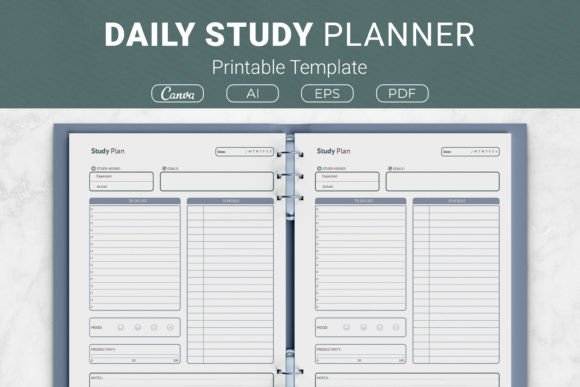
- Daily planning – Use a structured page for your to-do list, priorities, and quick notes. The soft lines keep your handwriting aligned, even on a tablet.
- Meeting notes – Reserve a layout with clear sections for action items, key decisions, and follow-ups. This helps you review past meetings quickly without scanning messy pages.
- Project brainstorming – A freeform or mind-mapping page gives you space to explore ideas without rigid constraints. The white background encourages creative thinking.
- Study summaries – Students can use organized layouts for chapter reviews, vocabulary lists, or concept maps. Consistency across subjects makes exam preparation easier.
- Content planning – Bloggers and marketers can outline posts, track campaign ideas, and note deadlines. Having a dedicated template for content keeps everything in one place.
- Personal journaling – A minimalist layout with soft lines works beautifully for reflective writing, gratitude lists, or daily highlights.
The key is to experiment. Try different pages for different purposes until you find combinations that feel natural. Over time, you will develop a workflow that suits your specific needs without forcing yourself into a rigid system.
Important Considerations Before You Start
While digital notes templates are straightforward, a few practical points can help you get the most out of them. First, think about the app you plan to use. Most PDF-compatible note-taking apps work well, but it is worth checking if your app supports importing templates and adding pages easily. GoodNotes, Notability, OneNote, and similar tools are reliable choices.
Second, consider how you prefer to organize your notes. Some people like to have one notebook per project, while others prefer a single large notebook with tabs or searchable text. Templates work well in both scenarios, but deciding in advance saves time later. You can also mix templates with blank pages if you need flexibility.
Third, remember that the preview image shows all the pages, but the image itself is not included in the main file. This is standard for digital products, so rely on the preview to understand what you are getting, then use the actual PDF or JPG files in your app.
Fourth, size matters. A5 templates are compact and great for quick notes on a phone or small tablet. A4 and US Letter sizes offer more space for detailed planning, sketching, or project management. If you are unsure, starting with US Letter or A4 is usually safer because you can always zoom in, but you cannot easily add more space to a smaller page.
Why the Design Matters for Your Experience
The soft lines and white background are not just aesthetic choices. They directly affect how you interact with the template. Strong grids or dark lines can feel restrictive and visually loud, especially when you are adding your own colors. Soft lines guide your writing without overpowering it. The white background also reduces ink bleed effect when using pressure-sensitive styluses, and it makes your notes look crisp when exported as images or PDFs.
If you use colored markers, highlighters, or digital stickers, this kind of design becomes even more valuable. Your content stays front and center, while the template quietly supports your structure. This is one of those small details that makes a big difference over weeks and months of daily use.
Getting Started with Your Download
When you purchase the template pack, you receive one zip file containing everything you need. Inside, you will find a PDF in three sizes and a JPG folder for A4 pages only. The PDF is the primary format for most note-taking apps because it retains sharp lines and supports hyperlinks if included. JPG files are handy if you want to use a single page as a background image or quickly share a screenshot of your notes.
To begin, unzip the folder, choose your preferred size, and import the PDF into your note-taking app. From there, you can duplicate pages, reorganize them, or combine them with other templates. The 30-page variety gives you room to explore without feeling overwhelmed. If you like a particular layout for daily use, simply copy it and fill a whole notebook with that structure.
Long-Term Benefits of Using Structured Templates
Over time, using a consistent template system helps you build a searchable, organized archive of notes. Instead of flipping through physical notebooks or scrolling through endless screenshots, you have a tidy digital library where every page follows a familiar pattern. This is especially valuable for professionals who need to revisit notes months later, or for students preparing for cumulative exams.
Additionally, digital notes are easy to back up, tag, and share. You can export a single page as an image for a client, archive a whole notebook to cloud storage, or print selected pages if you ever need a physical copy. The flexibility of digital templates supports both digital-first workflows and hybrid approaches that combine screen and paper.
Final Thoughts on Choosing a Digital Notes Template
Whether you are new to digital note-taking or looking to refresh your current system, a well-made template set can improve your daily productivity and creative flow. The 30-page collection described here offers a balanced mix of layouts, sizes, and design simplicity. The white background and soft lines are thoughtfully chosen to support your writing without distraction, and the availability of PDF and JPG formats gives you flexibility across devices and apps.
Take time to explore the pages, adapt them to your routines, and enjoy the process of building a note-taking habit that actually works for you. When you find a system that feels natural, you will wonder how you ever managed without it. And if this particular pack fits your style, your support through a rating is always appreciated by small creators who pour effort into making these tools available.