Ultimate Planner Bundle Pack Vol.10: 48 PDF Templates That Actually Keep You Organized
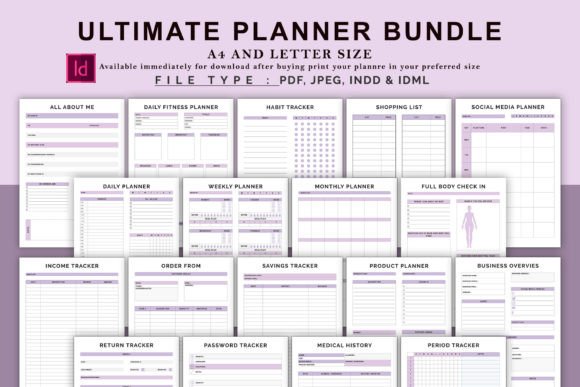
Most people buy a planner with the best intentions. They imagine color-coded schedules, neatly checked boxes, and a life that finally runs on track. A few weeks later, the planner sits untouched, buried under receipts and guilt. The problem isn't the person—it's usually how the planner is chosen, used, or understood in the first place. The Ultimate Planner Bundle Pack Vol.10 offers 48 PDF templates covering everything from daily meals to business finances, but even a well-designed bundle can fail if approached without a clear strategy. This article walks through common missteps people make with digital planners and how to avoid them, so you get real value from every page.
Why a Bundle Like This Appeals to So Many People
A single planner rarely fits every area of life. You might track fitness in one app, bills in a notebook, and goals on sticky notes. That fragmented approach leads to missed details and wasted time. The Ultimate Planner Bundle Pack Vol.10 consolidates 48 templates into one cohesive set—from a contact list and password tracker to a full business overview and period tracker. Whether you're a freelancer juggling projects, a parent managing household schedules, or a creator planning content, this bundle offers structure without forcing you to design your own systems. But having all these tools in one place only helps if you use them correctly.
Mistake #1: Trying to Use Every Template at Once
It's tempting to print or open all 48 pages immediately. After all, they're all useful, and you don't want to miss out. This is the fastest route to overwhelm. When you try to fill out a fitness planner, a social media planner, a meal planner, and a business overview all in the same day, the task becomes exhausting rather than empowering. You end up with half-filled pages, abandoned sections, and the feeling that the bundle itself is too much work.
Better approach: Start with three to five templates that solve your most pressing problem right now. If your biggest challenge is tracking daily meals and fitness, begin with the Daily Meal Planner, Daily Food Log, and Workout Log. Once those become habits, add the Weekly Planner or the Goal Action Plan. The bundle is designed to grow with you, not to be conquered in one sitting. By layering in new templates gradually, you build a sustainable system instead of a short-lived burst of organizational energy.
Mistake #2: Ignoring the Week Start Day
This bundle clearly notes that the week starts on Monday. It sounds like a small detail, but it matters more than most people realize. A Sunday-start week works well for religious communities or traditional calendar layouts, but a Monday start aligns with the typical workweek. If you're a professional, freelancer, or student, Monday-start planners help you plan ahead for the work days and then review on the weekend. Trying to force a Sunday start on a Monday-start template creates confusion when you're reviewing weekly goals or tracking habits across the weekend.
Practical tip: Embrace the Monday start. Use Sunday evening as your planning time—review the previous week, set intentions for the coming days, and fill in your Daily Planner or Weekly Planner with a clear head. This rhythm matches how most people actually live and work, reducing friction between the template and your routine.
Mistake #3: Skipping the Index and Contact List
These two templates often get overlooked because they seem basic. The Index helps you navigate the bundle, and the Contact List is straightforward. But when you start using multiple templates across different months—like a Savings Tracker, Birthday Tracker, and Medical History—you'll quickly lose track of where everything is. Without an Index, you'll waste time flipping through pages. Without a Contact List, you'll dig through your phone or email for someone's details when you need them.
Better use: Fill out the Index first. Number each template if they aren't numbered already, or note which page range each section uses. For the Contact List, include not just names and numbers but context—like "Sarah—web designer for Q4 project" or "Dr. Lee—annual checkup reminder." That context turns a simple list into a reference tool that saves real time.
Mistake #4: Treating the Planner Like a Static PDF
Digital planners aren't meant to be printed once and forgotten. The Ultimate Planner Bundle Pack Vol.10 comes as PDF files, which means you can use them in multiple ways. Some people print each page and fill it out by hand. Others use apps like GoodNotes, Notability, or Xodo to type directly onto the pages. A common mistake is choosing one method that doesn't fit your lifestyle. If you're always on the go, printing a bulky planner and carrying it everywhere might not work. If you prefer handwriting, filling out a PDF on a tablet with a stylus can feel unnatural.
Advice: Test two methods before committing. Print a few templates for a week of analog tracking, then try the same templates digitally. Notice which approach you actually stick with, not which one looks nicer. Some people discover they love digital tracking for budgets and passwords but prefer paper for daily check-ins and habit tracking. The bundle allows for hybrid use—no rule says you must use every template the same way.
Mistake #5: Overlooking the Business and Finance Templates
When people see a planner bundle, they often focus on the personal organization pages—daily planners, meal logs, fitness trackers. The business templates like Order Form, Advertising Tracker, Business Overview, and Return Tracker seem irrelevant unless you run a company. But many freelancers, creators, and side-hustlers don't realize they need these until they're buried in scattered receipts and unpaid invoices.
Even if you don't have a formal business, the Income Tracker and Upcoming Expenses pages are invaluable for anyone managing personal finances. The Savings Tracker and Annual Overview give you a bird's-eye view of your financial year. Ignoring these templates means missing out on the very tools that turn a chaotic budget into a clear plan.
Practical step: Schedule 30 minutes once a month to update the Income Tracker, Savings Tracker, and Upcoming Expenses. Treat it like a non-negotiable appointment. Within two months, you'll have a financial snapshot that most people never create, and you'll wonder why you didn't start sooner.
Mistake #6: Using the Habit Tracker Without a System
Habit trackers are popular because they promise visible progress. The bundle includes a dedicated Habit Tracker, plus related pages like Sleep Tracker, Water Challenge, and Full Body Check In. A mistake people make is tracking too many habits at once or not defining what success looks like. Checking a box for "exercise" is vague. Did you walk for ten minutes or complete an hour-long workout? Without specificity, the tracker loses its power to motivate or reveal patterns.
Better method: Pick no more than five habits to track in any given month. For each habit, write a clear minimum standard. "Exercise" becomes "15 minutes of movement." "Drink water" becomes "8 glasses." "Sleep" becomes "7 hours before midnight." Use the Sleep Tracker and Water Challenge separately for deeper data, but keep the main Habit Tracker simple. When you see consistent check marks, you build momentum. When you miss days, you can adjust your standards rather than abandon the habit entirely.
Mistake #7: Neglecting the Password Tracker and Birthday Tracker
These two templates seem like afterthoughts, but they solve recurring frustrations. Most people store passwords either in their browser (which is risky) or on random sticky notes (which get lost). Similarly, birthdays are often remembered only when Facebook sends a notification. The Password Tracker in this bundle lets you record logins securely if you keep the PDF encrypted or stored in a protected folder. The Birthday Tracker gives you a simple one-page view of the entire year, so you never miss an important date.
Tip: For the Password Tracker, never store full passwords on an unencrypted file. Instead, use the template to log which service, the username, and a hint that only you understand. The Birthday Tracker works best when you fill it out on a Sunday and set your own reminders—don't rely on the template itself to alert you.
Mistake #8: Forgetting to Review and Iterate
Planners are not magical. Filling out a Daily Check In or Weekly Fitness Planner won't change your life unless you look back at the data. People often complete templates day after day but never analyze what the patterns tell them. The Full Body Check In and Fitness Progress pages exist specifically to compare measurements over time. The Lifestyle Log captures daily notes that reveal stress triggers or energy patterns. If you don't review these pages every few weeks, you're just collecting data instead of gaining insight.
Build a review habit: At the end of each month, set aside 20 minutes to flip through your completed templates. Look at the Habit Tracker—which habits stayed consistent? Check the Fitness Progress—is your weight or strength moving in the direction you want? Scan the Daily Food Diary—do you notice any patterns around energy or mood? Use the Annual Overview page to mark milestones and set new goals. This reflection turns a bundle of PDFs into a genuine growth tool.
What to Check Before You Start Using This Bundle
Before diving into all 48 templates, verify a few things. First, confirm that the PDF format works on your device. If you plan to use a tablet, make sure your note-taking app supports PDF import. If you plan to print, check that your printer handles the layout without cutting off edges. Second, decide whether you want to keep all templates in one file or split them into separate documents. A single file is easier to navigate if you use the Index, but separate files let you delete unused pages without confusion. Third, set a realistic time commitment. The Ultimate Planner Bundle Pack Vol.10 is comprehensive, and that's its strength, but you don't need to engage with every page right away. Let your current priorities dictate which templates get filled first.
Final Thoughts on Getting Real Value
A bundle of 48 templates offers tremendous flexibility, but flexibility can feel like a burden if you don't have a plan. The Ultimate Planner Bundle Pack Vol.10 includes everything from a simple To-Do list to a detailed Business Overview, giving you the tools to organize nearly every aspect of your life. The difference between someone who benefits from this bundle and someone who abandons it comes down to approach. Start small, use the Monday-start rhythm, fill out the Index early, and review your data regularly. Avoid the trap of trying to be perfectly organized from day one. Instead, let the templates support your actual routines, and adjust as you go. When you treat the bundle as a flexible toolkit rather than a rigid system, you'll find that organization finally sticks—and that's the whole point.